When you store something important like passwords, documents, or personal information, the biggest concern is simple: who else can see this?
HexaVault is designed with one clear goal - only you can access your data. Not us, not anyone else.
To understand how that works, let's break things down in plain language.
Part 1: Understanding the Basics
What is Encryption?
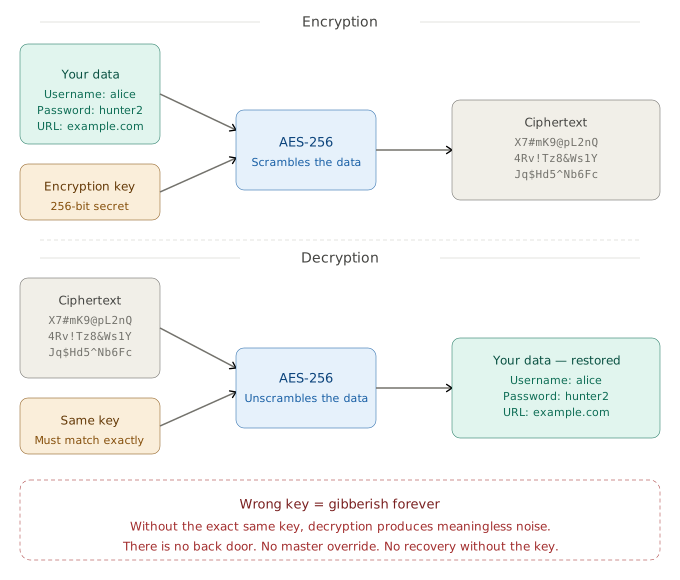
Encryption is like putting your data into a locked box.
- You put your information inside
- It gets scrambled into something unreadable
- Only someone with the right key can unlock it
That's encryption. It transforms readable information (called plaintext) into scrambled gibberish (called ciphertext)
What is Decryption?
Decryption is simply unlocking that box using the correct key to get your original data back.
The critical point: Without the key, the scrambled data is essentially useless. Even with the most powerful computers on Earth, breaking modern encryption by brute force would take longer than the age of the universe.What is an Encryption Key?
A key is a long string of random data - think of it as an extraordinarily complex password that your computer uses behind the scenes. HexaVault uses 256-bit keys, which means the key is chosen from 2256 possible combinations. That's a number with 78 digits. Guessing it is not just hard - it is practically impossible.
What is Hashing?
Hashing is a one-way transformation. You put data in, and you get a fixed-length "fingerprint" out. The crucial property: you cannot reverse it. You can never work backwards from the fingerprint to recover the original data.
This is how HexaVault validates your password without ever storing it. It stores only the fingerprint, never the password itself.
What is a Salt?
A salt is a random string of characters unique to each user that gets mixed into the password before hashing. Imagine two users both choose the password "sunshine." Without a salt, they'd produce identical fingerprints - and if a hacker cracked one, they'd crack both. With different salts, each user's password produces a unique fingerprint.
HexaVault assigns every user their own unique, permanent salt.
What is an IV (Initialisation Vector)?
An IV is a random "starting point" injected into the encryption process. Its purpose is to ensure that if you encrypt the same piece of data twice, you get a different ciphertext both times. This prevents an attacker from detecting patterns - for example, noticing that two entries look identical and guessing they contain the same information.
HexaVault generates a unique IV for each individual field of every entry you store. The entry name, data, file, and file name are each encrypted with their own IV. No two encrypted fields look alike, even if their contents are identical.
Part 2: The Algorithms HexaVault Uses - and Why They're the Best
Now that the basics are clear, let's explore the specific algorithms HexaVault employs to ensure your data remains secure. HexaVault didn't pick these algorithms arbitrarily. Each one represents the current gold standard for its purpose.
Argon2id - For Validating Your Password
What it does: Converts your password into a secure fingerprint for login verification.
Why it's exceptional:
- Argon2id is the winner of the Password Hashing Competition - an international contest where cryptographers from around the world competed to design the most secure password hashing algorithm.
- It is deliberately slow and resource-hungry. This sounds like a flaw, but it's actually the entire point. For a legitimate user logging in once, this slowness is imperceptible - a fraction of a second. But for a hacker trying to test billions of password guesses, it becomes a near-insurmountable barrier.
- It requires significant memory to compute, which defeats specialised hacking hardware (like the GPU farms that crack simpler hashes in minutes).
- It combines the strengths of its predecessors, Argon2i and Argon2d, making it resistant to both side-channel attacks and brute-force attacks.
PBKDF2 - For Deriving Your Encryption Key
What it does: Takes your password and transforms it into the 256-bit encryption key that locks and unlocks your data.
Why it's exceptional:
- PBKDF2 stands for Password-Based Key Derivation Function 2. It is a NIST-approved standard, meaning it has been vetted and recommended by the US National Institute of Standards and Technology.
- It runs your password through thousands of rounds of hashing, making the key derivation process computationally expensive - once again, a trivial delay for you, but a crushing barrier for attackers.
- The combination with your unique per-user salt means the resulting key is entirely unique to you. No one else's key will ever match yours.
AES-256-GCM - For Encrypting Your Data
What it does: The actual algorithm that scrambles your data into ciphertext and unscrambles it back to plaintext when you access it.
Why it's exceptional:
- AES stands for Advanced Encryption Standard. It is the encryption algorithm used by governments, militaries, and security-conscious companies worldwide to protect their most sensitive data.
- 256-bit refers to the key size. AES-256 is currently considered unbreakable by brute-force attacks with existing technology. A 256-bit key means there are more possible keys than there are stars in the observable universe. Brute-force attacks are not just impractical - they are physically impossible with any conceivable technology.
- GCM (Galois/Counter Mode) is a mode of operation that provides both confidentiality and integrity. It ensures that not only is your data encrypted, but also that any tampering can be detected.
HMAC-SHA256 - For Verifying Your Recovery Key
What it does: Creates a tamper-proof verification fingerprint of your recovery key. This allows you to verify that you've entered the correct recovery key without HexaVault ever storing the key itself.
Why it's exceptional:
- HMAC (Hash-based Message Authentication Code) combines a hash function with a secret key, producing a fingerprint that can only be recreated if you have both the original data and the secret.
- SHA256 is a cryptographic hash function that produces a fixed-size 256-bit (32-byte) hash. It is currently considered secure and is widely used in various security applications.
Part 3: Putting It All Together - How HexaVault Actually Works
Now that we've covered the individual components, let's see how they work together in practice when you create an account and store your data.
When You Create Your Account
When you sign up for HexaVault, here's what happens step-by-step:
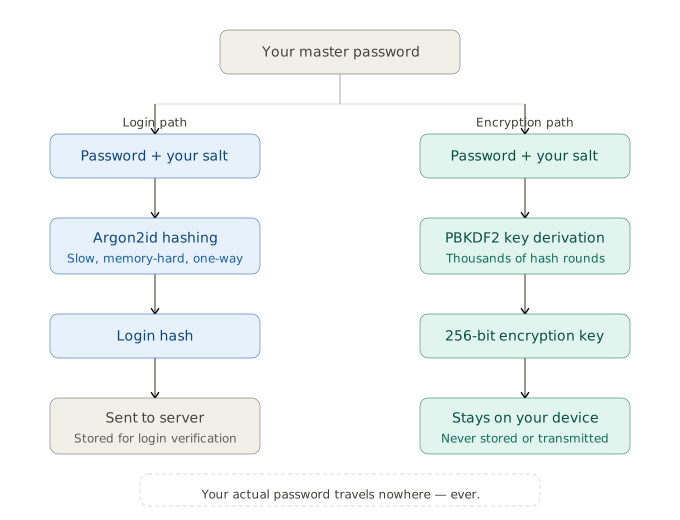
- You choose a master password. This is the only password you'll ever need to remember.
- HexaVault generates a unique salt specific to your account - a random string that will always be associated with you.
- Your password is combined with your salt and fed into Argon2id, producing a secure hash. This hash is sent to our servers - it is your login credential. Your actual password is never sent or stored anywhere.
- HexaVault then uses PBKDF2 to derive your 256-bit encryption key from your password and salt. This key is never stored or transmitted - it only exists in your browser's memory while you're logged in.
When You Save Something
Every time you store a piece of information - website login, credit card details, identity document like passport:
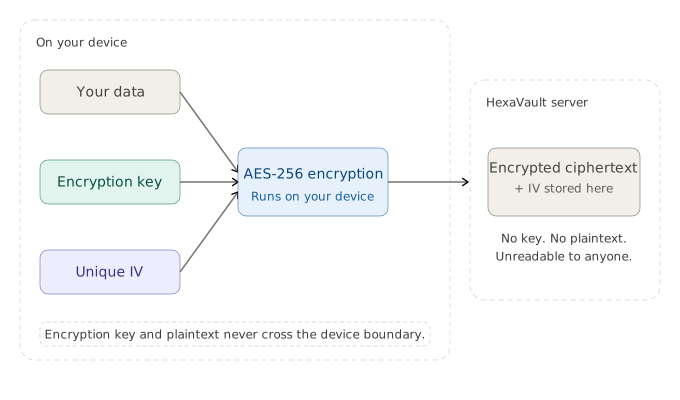
- Each piece of data is encrypted separately using AES-256-GCM, each with its own unique IV.
- When you attach a file, it is encrypted using AES-256-GCM with a separate randomly generated 256-bit key. That file key is then itself encrypted with your main encryption key and its own unique IV before being stored.
- The resulting ciphertext, along with the IVs, is sent to HexaVault's servers for storage. We never receive or store the main encryption key or any unencrypted data.
- The server and the mobile app stores only encrypted gibberish it cannot read. No key. No plaintext. Nothing useful to an attacker.
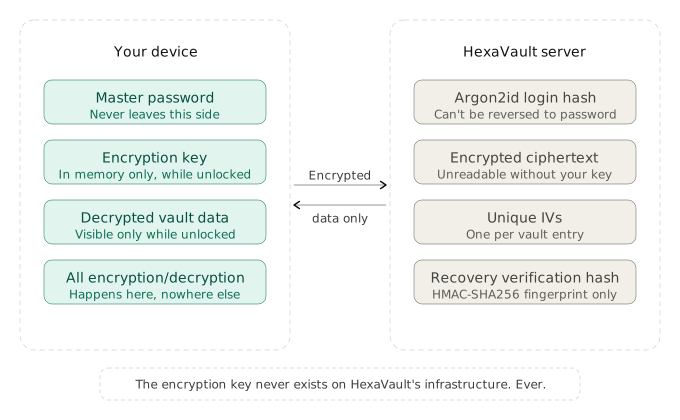
This process happens entirely on your device - your browser, mobile app. Your password and encryption key never leaves your device. This is the foundation of zero-knowledge encryption.
Accessing Your Data
When you log in and access your vault:
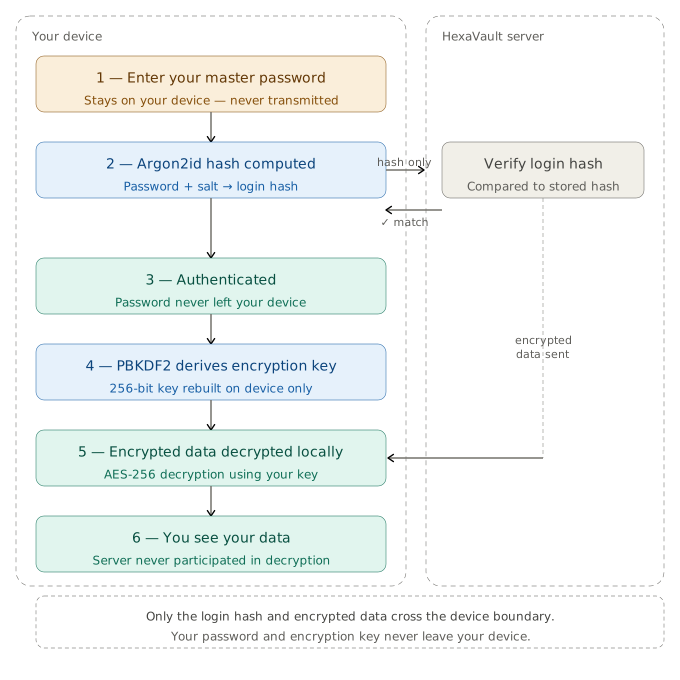
- You enter your master password.
- Your device combines it with your salt and runs Argon2id - the resulting hash is sent to the server for verification.
- If it matches, you're authenticated. Your actual password never left your device.
- Your device then runs PBKDF2 on your password to reconstruct your 256-bit encryption key - entirely on your device.
- Your encrypted data is downloaded from the server and decrypted locally using your key.
- You see your information. The server never participates in decryption.
A Note on Mobile Storage
On the mobile app, your encrypted vault data is also cached locally on your device - this is what allows HexaVault to work offline and load quickly without fetching everything from the server each time. It's important to understand what this means for your security:
- What's stored locally is identical to what's on the server - fully encrypted ciphertext. Your encryption key is never written to your device's storage unless you choose to enable biometric login.
- The encryption key exists only in memory, and only while you are actively logged in. The moment you lock your vault or close the app, the key is gone from memory.
- If you enable fingerprint/face login, HexaVault stores your encryption key in your device's secure keychain - a dedicated, hardware-protected storage area built into your phone specifically for secrets like this. The keychain is isolated from all other apps and from the operating system itself. The key stored there can only be retrieved after a successful biometric authentication - your phone's hardware enforces this, not just software. It is fundamentally different from and far more secure than regular device storage.
- If someone stole your phone and extracted the local storage, they would find the same encrypted gibberish that's on our servers - completely unreadable without your master password or, if enabled, your biometric.
- If you do not enable biometric login, the encryption key is never written anywhere on the device at all - it lives only in memory during your session and disappears when you lock your vault.
Zero-Knowledge Architecture
This is what "zero knowledge" means. We have zero knowledge of your actual data, your password, or your encryption key. Not because we promise not to look - but because the system is mathematically designed so that there is nothing useful to look at.
Even if a hacker were to breach our servers and steal all the encrypted data, they would have nothing to work with. Without the keys, the data is just random noise. They would not be able to decrypt a single entry.
Part 4: What Happens If You Forget Your Password?
Because HexaVault does not store your password or encryption key, we cannot reset your password the traditional way.
So we provide an optional feature: a Recovery Key.
How the Recovery Key Works
Step 1: You Generate a Recovery Key
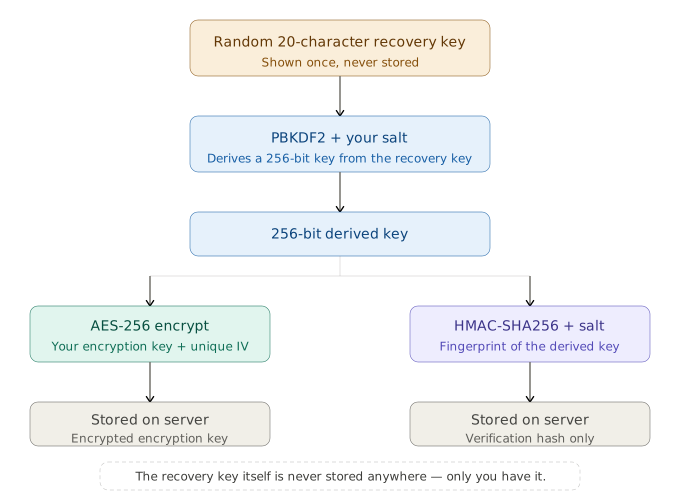
- A random 20-character alphanumeric string is created - formatted for readability, something like 9SL4-Q4LO-YJ99-LA29-CT33
- It is shown to you only once - HexaVault never stores it, not on our servers, not on your device
- You must save it securely. Treat it like a physical key to a safe.
Step 2: Protecting Your Encryption Key
Your master password derives your encryption key, and your encryption key locks all your data. The recovery process needs a way to get that encryption key back to you without knowing your password. Here's how it works:
- The recovery key is put through PBKDF2 (the same key derivation process used for your master password) combined with your user-specific salt, producing a strong 256-bit derived key.
- Your encryption key is then encrypted using AES-256-GCM with this derived key and a unique recovery IV.
- This encrypted encryption key is stored on our server. We cannot decrypt it - we don't have the recovery key, and we never will.
- Finally, the derived key is fingerprinted using HMAC-SHA256 combined with your user-specific salt, producing a verification hash that is also stored on our server. This allows HexaVault to confirm a recovery key entered in the future is genuine - without storing or knowing the recovery key itself.
Think of it this way: we're holding a locked box (your encrypted encryption key). Only your recovery key - after being mathematically strengthened - can open it. We also have a way to confirm whether the key you hand us is the right one (the HMAC hash), but that confirmation tells us nothing about the key itself.
Step 3: Using Your Recovery Key to Regain Access
If you forget your vault password:
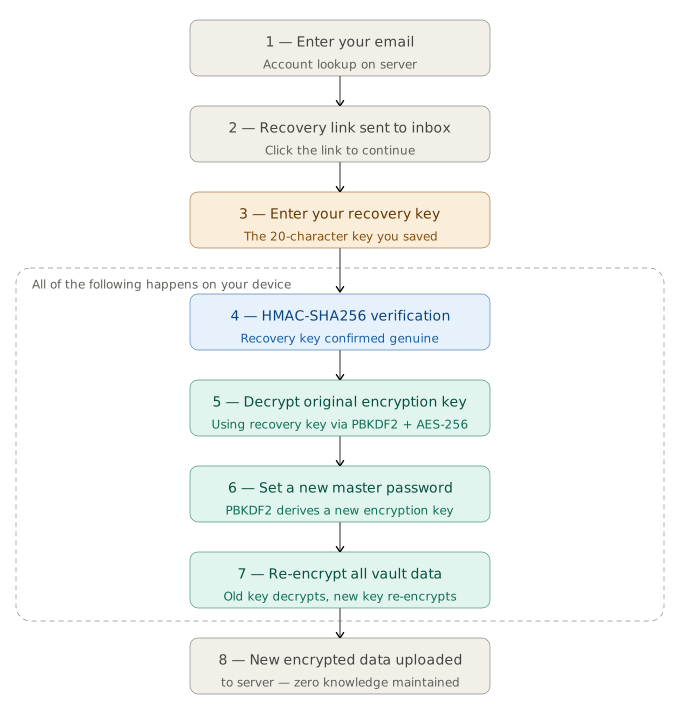
- You enter your email address. If an account exists, HexaVault sends a recovery link to that email.
- You click the link and are prompted to enter your 20-character recovery key.
- HexaVault computes its HMAC-SHA256 fingerprint and checks it against the stored hash - verifying the key is genuine without ever storing it.
- If valid, your recovery key is used to decrypt your original encryption key - entirely on your device.
- You set a new master password. A new encryption key is derived from it via PBKDF2.
- All your vault data is decrypted with the old key and immediately re-encrypted with the new key, on your device.
- The new encryption key is then re-encrypted with your recovery key (via the same PBKDF2 + AES-256-GCM process) and the updated encrypted encryption key is stored on the server - so your recovery key remains valid for future use without any changes.
- The newly encrypted data is uploaded back to our servers, replacing the old ciphertext. Your vault is fully restored, and you can log in with your new password. Zero knowledge maintained throughout.
Part 5: Final Thoughts - Why HexaVault's Security Matters
In a world where data breaches are increasingly common, and where our digital lives contain more and more sensitive information, the security of your password manager is paramount. HexaVault's zero-knowledge architecture means that even in the worst-case scenario of a server breach, your data remains safe and unreadable.
Let's look into the security implications with some real-world scenarios:
Scenario 1: HexaVault's servers get compromised
If an attacker or a rogue employee gains unauthorized access to our servers - what do they get? Encrypted gibberish they cannot read. Argon2id hashes they cannot reverse. Salts that are useless without passwords. They walk away with nothing actionable.
Scenario 2: You lose your phone
If someone finds or steals your phone, what they get depends on your setup. Without biometric login enabled, your encryption key was never written to the device - there is nothing to extract. With biometric login enabled, your key sits in the device's secure hardware keychain, inaccessible without your fingerprint or face. Either way, the locally cached vault data is fully encrypted and unreadable. You can log into HexaVault on a new device with your master password and continue as normal.
Scenario 3: You're subjected to a legal order
A government demands your data from us. We hand over exactly what we have - encrypted gibberish and login hashes. Technically compliant. Practically useless to anyone without your password.
Scenario 4: You forget your password
If you set up a recovery key and kept it safe, you can regain access - but the process requires both access to your registered email to receive the recovery link, and your 20-character recovery key to decrypt your encryption key. Neither alone is enough. An attacker who finds your written recovery key cannot use it without your email. An attacker who compromises your email cannot do anything without the recovery key. If you didn't set up a recovery key, your data is gone. That's not a product failure - that's zero knowledge security working exactly as intended.
Conclusion
HexaVault's security isn't a feature we added - it's the foundation everything is built on. Every algorithm was chosen because it represents the global standard for its purpose. Every operation was placed on your device deliberately. Every piece of data on our servers was designed to be worthless without your password.